9 Social Media Mistakes Content Creators Make (And How to Fix Them)
By Ambar Medrano ~Marketing student at the University of Illinois
Ambar is passionate about social media marketing and new product development.
9 Social Media Mistakes Content Creators Make (And How to Fix Them)
If you’re in college or just starting your career, social media is basically your public resume and your portfolio too. It can open doors (or close them), land you internships, and help you build a brand long before you have a fancy job title. But the same platforms that can help you stand out can also make you look unprofessional if you’re not careful.
The good news is that most people make the same mistakes, and guess what? If you keep reading, you’ll learn how to fix them too! It’s much easier than you think to create posts that actually help you instead of hurt you, and once you know what to look for, those mistakes are way easier to avoid.
So let’s get started…
#1 Treating Grammar Like It Doesn’t Matter
Yes, we all make typos. But consistently sloppy spelling and grammar can make you look careless, unprofessional, and just not ready for real responsibility. When someone sees “there” instead of “their” in a post where you’re trying to sound smart, it’s very hard to unsee. On social, strangers will absolutely roast you for obvious mistakes, and your posts are often the first “writing sample” people see from you. We all know how important first impressions are, right? One mistake is okay. Five mistakes in three posts? Not okay.
So how do you fix this? Very simple.
- Draft captions in Google Docs or Word so you get built‑in spell check and grammar suggestions. It’s very easy these days to get automatic captions on your videos but make sure you always double‑check what they say so there are no spelling or grammar issues. Grammarly can help too, so don’t be afraid of using tools to make quality content. It’s never “doing too much” when the result could help you land a job.
- Read your caption out loud once. If a sentence feels awkward or confusing, rewrite it. You don’t have to sound like William Shakespeare or anything; you just need to look like you care enough to proofread. Remember that who your audience is and how you’re trying to communicate with them is super important. You want people to engage with your content, so making sure everything is clearly communicated can make people come back again.
#2 Posting the Same Thing Everywhere Without Adapting
Another HUGE mistake is treating all platforms exactly the same. Each app has its own “language,” and ignoring that is like giving a class presentation in the wrong room. Think about it: do you go to Instagram to watch full YouTube vlogs? Nope. If you want to watch more than a minute and a half of content, you go to YouTube.
Two things to think about: format and audience.
Format: Design for the Screen People Actually Use
Different platforms are built around different shapes and styles of content:
- YouTube: best for horizontal, longer‑form videos.
- TikTok and Instagram Reels: vertical, full‑screen videos that are fast‑paced and mobile‑first.
- Pinterest: taller, vertical images and infographics that stand out while scrolling.
If you upload a wide, horizontal video to a vertical‑first platform and it shows up with black bars on the sides, most people will swipe away because it doesn’t feel like it was meant for that app. Think about it this way: you want your product (your content) in the right packaging.
Read: How to Get Your Website to make Clients fall in love with your brand
Audience: Different Apps, Different People
Your followers aren’t the same everywhere, and not all platforms appeal to everyone. Most college students want quick entertainment, so they go to TikTok but other generations like Baby Boomers or Generation X would prefer Facebook. Research shows that over 90% of US Gen Z and Millennial users watch short-form content frequently or sometimes across platforms like TikTok, YouTube and Instagram. If you want to target your mom or your grandma, you might want to post on Facebook with more tailored content. The Sprout Social 2026 Content Strategy Report shows some takeaways from Facebook leaning more toward Millennials, Gen X, and Baby Boomers, and that the best content there is often practical and useful, like “how to change a setting on your iPhone” or “ways to save money” that show real‑world usage.
Before you post, ask yourself: “Who usually sees my content on this app?” and “How do they like content to look and feel here?”
#3 Posting in Huge Bursts… Then Vanishing
This happens a lot: you get motivated, post constantly for a few weeks, see some growth, burn out, and then disappear for months. Algorithms and audiences both hate that.
Best‑practice guides emphasize consistency over intensity. Many universities and marketing teams recommend a steady, realistic schedule. Always prioritize your time, your school, and your responsibilities, but make sure to plan ahead so you can also schedule time for yourself.
Instead of burning out trying to post three times a day for 30 days and then vanishing, try creating a batch of content one day, then editing another day and scheduling one post per week, or a few over a longer period.
Don’t be afraid of using tools. Canva can help you with a content calendar, and you can even link your social media accounts, so your posts go out even when you’re busy with exams. Think of it like studying: 30 minutes most days beats a single all‑nighter. Be gentle to yourself.
Read: Marketing Myths that Destroy Consumer Trust
#4 Ignoring Comments and DMs
A lot of people treat social media like a one‑way broadcast: post, log off, repeat. But the “social” part is what builds trust and community.
When you ignore comments, you miss out on:
- Stronger relationships with people who already like your content.
- More engagement, which algorithms tend to reward.
- Natural opportunities: collabs, feedback, or even job leads.
Many social media best‑practice guides say the same thing: respond to comments, acknowledge people, and make your followers feel seen. You can do that as a student too.
Try some easy habits:
- Set aside 10–20 minutes a day just to respond to comments and messages.
- At least react to comments so people know you saw them.
- Ask questions in your captions so conversation is built in (“Which one would you choose?” “Do you have any recommendations?”).
You don’t need to respond to every single thing right away but being present and interactive can separate you from people who just post and disappear.
#5 Using Way Too Many Hashtags
Hashtags can help people find your content, but dumping 30 random ones under every post looks spammy and unprofessional. It can even backfire if platforms see it as keyword stuffing rather than relevant tagging.
A smarter approach is to use fewer, more specific tags:
- Mix a few broad ones with a few niche ones:
- Broad: #travel, #college, #marketing
- Niche: #ChampaignIllinoisCoffee, #StudyAbroadTips, #FirstGenStudents
Stick to a small number that’s actually relevant to your post. Many marketers recommend about 5-7; YouTube shorts only allow 3, but Instagram lets you do 5, so maybe it’s safe to stay around that range.
#6 Never Checking Your Analytics
If you’re not using analytics, you’re basically guessing.
Every major platform gives you performance data:
- Which posts got the most views, saves, comments, and shares.
- When your audience is most active.
- Basic info like age, location, and gender.
Use that information in your favor. Social media strategy guides constantly recommend using this data to shape what you post next instead of relying only on “what feels right.” For example:
- If short, practical tips outperform long story time posts, that’s a signal to share more of that kind of content.
- If your audience is most active between 3–5 p.m., you can schedule your posts during that time.
What should you start doing?
- Once a month, look up your top 5 posts and ask: “What do they have in common?” Maybe it’s the topic, style, or length if it’s a vlog.
- Make a few new posts that copy those patterns on purpose and see if they do well again. This can help you tailor your content and brainstorm ideas more easily.
- If something consistently underperforms, think about adjusting it or just dropping it.
Treat your account like a mini experiment: test, measure, and tweak.
#7 Trying to Be Everywhere at Once
When you’re in college, time and energy are limited. Another mistake is trying to be active on every platform just because everyone else is.
Most social media pros recommend choosing a realistic mix based on your audience and goals. For example:
- If you want to attract recruiters or grad programs, focus on LinkedIn plus one visual platform where you can show your work, like Instagram or TikTok if you mainly post short videos.
- If you want to grow as a creator, maybe TikTok and Instagram are your main priorities.
You can still claim usernames on other platforms, but you don’t have to treat each one as a full‑time job. We’re not there yet.
A simple starter plan:
- Choose 1–2 main platforms.
- Decide on a posting frequency you can actually maintain (for example, 2–3 times a week on each).
That way you can grow steadily without letting social media take over your entire life.
Read: The Biggest New Product Launch Failures from New Coke to the Ford Edsel
#8 Not Reusing Your Content and Trying to Reinvent the Wheel
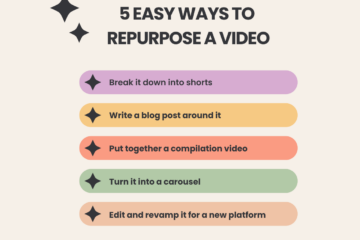
Always work smarter, not harder. Take videos of everything and don’t be afraid to use the same shots for multiple posts. You can turn one campus vlog into a Reel, a TikTok, a YouTube Short, and even a photo carousel with text over screenshots. Again, use the tools our generation has given us and lean on templates. CapCut is very user‑friendly, so try playing around with it and using the templates there; they are super helpful for quick, trendy edits.
Save yourself TONS of time by batch‑filming and batch‑editing. For example, film three outfit clips in one day and spread them out across the week instead of starting from scratch every single time. Reusing your ideas and footage doesn’t make you lazy; it makes you strategic. Most people won’t even notice they’re seeing the same clips in different formats; they’ll just think you’re posting consistently.
#9 Not Using Social Media Management Tools
I’ve mentioned a couple platforms that can be really useful and user‑friendly for editing your videos (CapCut) and others to create a content calendar (Canva), but there are many more. Notion or TickTick can also be used for free. Even though they don’t auto‑post your videos, you can still schedule content directly on each social platform and use these apps to plan ahead, write down reminders, store ideas, and organize your week.
Some other platforms include the following:
- Buffer: best for social media scheduling, and they have a free plan available if we want to be budget-friendly, but they have plans starting at $6 per month which is one drink at Starbucks basically.
- Sendible: an affordable all-in-one social media management app, it nails the basics and is very easy to use, while its not on the higher end of best social media management tools, it provides a good overview of how your posts are performing.
Bringing It All Together
If you’re a college student or recent grad, you don’t need a marketing degree to get social media “right.” You just need to avoid the most common mistakes:
- Sloppy spelling and grammar that hurt your credibility
- Ignoring the unique format and audience of each platform
- Posting in intense bursts and then disappearing
- Treating comments like background noise instead of conversations
- Stuffing posts with hashtags instead of using a few strategic ones
- Guessing instead of checking your analytics
- Spreading yourself too thin across every platform at once
- Not reusing your content and trying to reinvent the wheel
- Not using social media management tools
If you fix those, your social media will already be more thoughtful, more professional, and more effective than most people our age, and you never know… You might land an internship or simply have more to add to your portfolio, which can help you stand out for future jobs!